전역 상태 관리가 필요한 이유
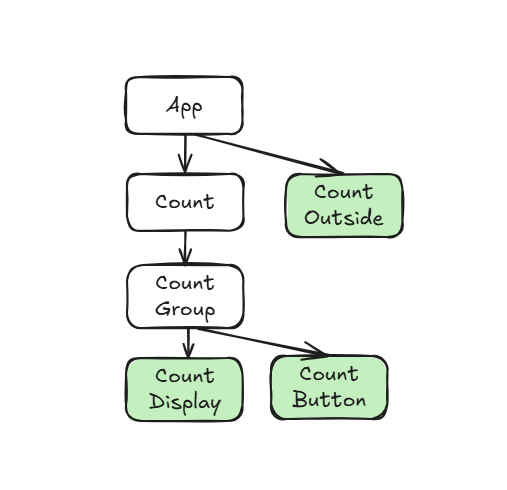
CounOutside, CountDisplay, CountButton에서 사용할 상태를 정의
ㄴ 공통 부모 컴포넌트인 App 컴포넌트 내부에 정의
Count, CountGroup 컴포넌트는 상태값을 사용하지 않지만 props를 받아서 하위 컴포넌트로 전달해야 함
ㄴ props drilling
props drilling 해결 방법
- Context API
- Redux ToolKit
- Zustand
Context API
먼저 Context 객체를 생성한 후에 해당 객체를 통해 데이터의 공유 범위와 공유할 데이터를 설정
--> Context 객체의 공유 범위에 포함된 다른 컴포넌트들은 공유하는 데이터를 가져와서 사용할 수 있음
Context 객체를 받을 변수는 대문자로 시작
ㄴ 컴포넌트처럼 사용할 것이기 때문
기존 App.tsx 코드
// App.tsx

import { createContext, useState } from "react";
import Count from "./components/Count";
import CountOutside from "./components/CountOutside";

export default function App() {
  const [count, setCount] = useState(0);

  const increment = () => {
    setCount((prevCount) => prevCount + 1);
    console.log(count);
  };

  const decrement = () => {
    setCount((prevCount) => prevCount - 1);
  };
  const reset = () => {
    setCount(0);
  };

  return (
    <>
      <Count
        count={count}
        increment={increment}
        decrement={decrement}
        reset={reset}
      />
      <CountOutside count={count} />
    </>
  );
}
변경 App.tsx 코드
// App.tsx

import { createContext, useState } from "react";
import Count from "./components/Count";
import CountOutside from "./components/CountOutside";

type CounterContextType = {
  count: number;
  increment: () => void;
  decrement: () => void;
  reset: () => void;
}
export const CounterContext = createContext<CounterContextType | null>(null);

export default function App() {
  const [count, setCount] = useState(0);

  const increment = () => {
    setCount((prevCount) => prevCount + 1);
    console.log(count);
  };

  const decrement = () => {
    setCount((prevCount) => prevCount - 1);
  };
  const reset = () => {
    setCount(0);
  };

  return (
    <>
      <CounterContext value={{ count, increment, decrement, reset }}>
        <Count
          count={count}
          increment={increment}
          decrement={decrement}
          reset={reset}
        />
        <CountOutside count={count} />
      </CounterContext>
    </>
  );
}
^ CounterContext 내부의 value에는 공유할 변수들을 객체 형태로 전달
기존 CountOutside.tsx
// CountOutside.tsx

export default function CountOutside({ count }: { count: number }) {
  return (
    <>
      <h1>CountOutside: {count}</h1>
    </>
  );
}
변경 CountOutside.tsx
// CountOutside.tsx

import { useContext } from "react";
import { CounterContext } from "../App";

export default function CountOutside() {

  const { count } = useContext(CounterContext)!;

  return (
    <>
      <h1>CountOutside: {count}</h1>
    </>
  );
}
^ CounterContext는 CounterContextType or null 타입 --> null이 아님을 명시해주기 위해 ! 붙이기
기존 CountDisplay.tsx 코드
// CountDisplay.tsx

export default function CountDisplay({
  count,
}: {
  count: number;
}) {
  return (
    <>
      <h1>Count: {count}</h1>
    </>
  );
}
변경 CountDisplay.tsx 코드
// CountDisplay.tsx

import { useContext } from "react";
import { CounterContext } from "../App";

export default function CountDisplay() {

  const { count } = useContext(CounterContext)!;

  return (
    <>
      <h1>Count: {count}</h1>
    </>
  );
}
기존 CountButton.tsx 코드
// CountButton.tsx

export default function CountButton({
  increment,
  decrement,
  reset,
}: {
  increment: () => void;
  decrement: () => void;
  reset: () => void;
}) {
  return (
    <>
      <button onClick={decrement}>감소</button>
      <button onClick={reset}>리셋</button>
      <button onClick={increment}>증가</button>
    </>
  );
}
변경 CountButton.tsx
// CountButton.tsx

import { useContext } from "react";
import { CounterContext } from "../App";

export default function CountButton() {

  const { increment, decrement, reset } = useContext(CounterContext)!;

  return (
    <>
      <button onClick={decrement}>감소</button>
      <button onClick={reset}>리셋</button>
      <button onClick={increment}>증가</button>
    </>
  );
}
Context API 개선
Context는 별도의 파일로 분리해서 작성하는 게 코드의 유지보수 및 가독성 측면에서 좋음
src/context/counter/
- CounterContext.ts
- 전역 데이터 슬롯 정의
- 어떤 데이터와 어떤 함수들이 전역으로 공유될지 규격 제한
- CounterProvider.tsx
- 상태 격리 및 캡슐화
- 실제로 리액트의 useState 메모리를 할당하고, 비즈니스 로직(데이터를 변경하는 함수들)을 모아둔 역할
- useCounter.ts
- 캡슐화 보호 및 데이터 접근 추상화
- 하위 컴포넌트가 Context 내부 데이터에 접근할 때 쓰는 전용 인터페이스(커스텀 훅)이자 예외 처리기
// src/context/counter/CounterContext.ts

import { createContext } from "react";

type CounterContextType = {
  count: number;
  increment: () => void;
  decrement: () => void;
  reset: () => void;
};
export const CounterContext = createContext<CounterContextType | null>(null);
// src/context/counter/CounterProvider.tsx
import { useState } from "react";
import { CounterContext } from "./CounterContext";
export default function CounterProvider({
children,
}: {
children: React.ReactNode;
}) {
const [count, setCount] = useState(0);
const increment = () => {
setCount((prevCount) => prevCount + 1);
console.log(count);
};
const decrement = () => {
setCount((prevCount) => prevCount - 1);
};
const reset = () => {
setCount(0);
};
return (
<>
<CounterContext value={{ count, increment, decrement, reset }}>{children}</CounterContext>
</>
);
}// src/context/counter/useCounter.ts
import { useContext } from "react";
import { CounterContext } from "./CounterContext";
export default function useCounter() {
const context = useContext(CounterContext);
if (!context) {
throw new Error("useCounter는 CounterProvider 안에서만 사용 가능합니다"); // null 방지
}
return context;
}
변경 App.tsx 코드
// App.tsx

import Count from "./components/Count";
import CountOutside from "./components/CountOutside";
import CounterProvider from "./context/counter/CounterProvider";

export default function App() {
  return (
    <>
      <CounterProvider>
        <Count />
        <CountOutside />
      </CounterProvider>
    </>
  );
}
^ CounterContext를 호출하는 것이 아닌 CounterProvider를 호출
변경 CountOutside.tsx 코드
// CountOutside.tsx

import useCounter from "../context/counter/useCounter";

export default function CountOutside() {

  const { count } = useCounter();

  return (
    <>
      <h1>CountOutside: {count}</h1>
    </>
  );
}
Context API 리렌더링
불필요한 리렌더링 : 상태 변화와 직접적인 관련이 없거나 화면 인터페이스가 변하지 않는데도 부모 컴포넌트의 영향으로 발생하는 리렌더링
ㄴ React.memo 함수 또는 useCallback 훅을 사용하여 최적화
CounterProvider 내부의 상태값(count)이 변경됨 --> CounterProvider 컴포넌트 자체가 리렌더링 --> value={{ count, increment, ... }} 안의 객체가 매번 새로운 메모리 주소로 다시 생성됨 --> CounterContext를 사용하는 모든 하위 컴포넌트는 새로운 value를 받았다고 판단 --> 전부 강제 리렌더링 --> 숫자(count)를 사용하지 않는 CountButton 컴포넌트까지 렌더링
// src/context/counter/CounterContext.ts

import { createContext } from "react";

type CounterContextType = {
  count: number;
};
type CounterContextActionType = {
  increment: () => void;
  decrement: () => void;
  reset: () => void;
};
export const CounterContext = createContext<CounterContextType | null>(null);
export const CounterContextAction = createContext<CounterContextActionType | null>(null);
// src/context/counter/CounterProvider.tsx
import { useMemo, useState } from "react";
import { CounterContext, CounterContextAction } from "./CounterContext";
export default function CounterProvider({
children,
}: {
children: React.ReactNode;
}) {
const [count, setCount] = useState(0);
const increment = () => {
setCount((count) => count + 1);
};
const decrement = () => {
setCount((count) => count - 1);
};
const reset = () => {
setCount(0);
};
const memoization = useMemo(
() => ({ count, increment, decrement, reset }),
[],
);
return (
<>
<CounterContextAction value={memoization}>
<CounterContext value={{ count }}>{children}</CounterContext>
</CounterContextAction>
</>
);
}^ useMemo 훅을 사용하여 메모이제이션
// src/context/counter/useCounter.ts

import { useContext } from "react";
import { CounterContext, CounterContextAction } from "./CounterContext";

export function useCounter() {
  const context = useContext(CounterContext);
  if (!context) {
    throw new Error("useCounter는 CounterProvider 안에서만 사용가능합니다.");
  }
  return context;
}

export function useCounterAction() {
  const context = useContext(CounterContextAction);
  if (!context) {
    throw new Error("useCounter는 CounterProvider 안에서만 사용가능합니다.");
  }
  return context;
}
Context API reducer
// src/reducer/counterReducer.ts

export default function counterReducer(
  count: number,
  action: { type: string },
) {
  switch (action.type) {
    case "INCREMENT":
      return count + 1;
    case "DECREMENT":
      return count - 1;
    case "RESET":
      return 0;
    default:
      return count;
  }
}
// src/context/counter/CounterContext.ts

import { createContext } from "react";

type CounterContextType = {
  count: number;
};
type CounterContextActionType = React.ActionDispatch<[action: { type: string }]>;

export const CounterContext = createContext<CounterContextType | null>(null);
export const CounterContextAction =
  createContext<CounterContextActionType | null>(null);
// src/context/counter/CounterProvider.tsx
import { useReducer } from "react";
import { CounterContext, CounterContextAction } from "./CounterContext";
import counterReducer from "../../reducer/counterReducer";
export default function CounterProvider({
children,
}: {
children: React.ReactNode;
}) {
const [count, countDispatch] = useReducer(counterReducer, 0);
return (
<>
<CounterContextAction value={ countDispatch }>
<CounterContext value={{ count }}>{ children }</CounterContext>
</CounterContextAction>
</>
);
}// src/context/counter/useCounter.ts
import { useContext } from "react";
import { CounterContext, CounterContextAction } from "./CounterContext";
export function useCounter() {
const context = useContext(CounterContext);
if (!context) {
throw new Error("useCounter는 CounterProvider 안에서만 사용가능합니다.");
}
return context;
}
export function useCounterAction() {
const context = useContext(CounterContextAction);
if (!context) {
throw new Error("useCounter는 CounterProvider 안에서만 사용가능합니다.");
}
return context;
}// CountButtont.sx
import { useCounterAction } from "../context/counter/useCounter";
export default function CountButton() {
console.log("CountButton");
const countDispatch = useCounterAction();
return (
<>
<button onClick={() => countDispatch({ type: "DECREMENT" })}>감소</button>
<button onClick={() => countDispatch({ type: "RESET" })}>리셋</button>
<button onClick={() => countDispatch({ type: "INCREMENT" })}>증가</button>
</>
);
}
Context API 2개 적용해보기
// src/context/theme/ThemeContext.ts

import { createContext } from "react";

type ThemeContextType = {
  theme: string;
};

type ThemeContextActionType = {
  changeTheme: () => void;
};

export const ThemeContext = createContext<ThemeContextType | null>(null);
export const ThemeContextAction = createContext<ThemeContextActionType | null>(null);
// src/context/theme/ThemeProvider.tsx
import React, { useMemo, useState } from "react";
import { ThemeContext, ThemeContextAction } from "./ThemeContext";
export default function ThemeProvider({
children,
}: {
children: React.ReactNode;
}) {
const [theme, setTheme] = useState("light");
const changeTheme = () => {
setTheme((prevTheme) => prevTheme === "light" ? "dark" : "light");
}
const memoization = useMemo(() => ({ changeTheme }), []);
return (
<>
<ThemeContextAction value={ memoization }>
<ThemeContext value={{ theme }} >{children}</ThemeContext>
</ThemeContextAction>
</>
);
}// src/context/theme/useTheme.ts
import { useContext } from "react";
import { ThemeContext, ThemeContextAction } from "./ThemeContext";
export function useTheme() {
const context = useContext(ThemeContext);
if (!context) {
throw new Error("useTheme는 ThemeProvider 안에서만 사용가능합니다.");
}
return context;
}
export function useThemeAction() {
const context = useContext(ThemeContextAction);
if (!context) {
throw new Error("useTheme는 ThemeProvider 안에서만 사용가능합니다.");
}
return context;
}
// Theme.tsx

import { useTheme } from "../context/theme/useTheme";

export default function Theme () {

  const { theme } = useTheme();

  return (
    <>
      <h1>Theme: { theme }</h1>
    </>
  );
}
// ThemeButton.tsx
import { useThemeAction } from "../context/theme/useTheme";
export default function ThemeButton() {
const { changeTheme } = useThemeAction();
return (
<>
<button onClick={changeTheme}>테마 변경</button>
</>
);
}
// App.tsx

import Count from "./components/Count";
import CountOutside from "./components/CountOutside";
import Theme from "./components/Theme";
import ThemeButton from "./components/ThemeButton";
import CounterProvider from "./context/counter/CounterProvider";
import ThemeProvider from "./context/theme/ThemeProvider";

export default function App() {
  return (
    <>
      <ThemeProvider>
        <CounterProvider>
          <Count />
          <CountOutside />
          <Theme />
          <ThemeButton />
        </CounterProvider>
      </ThemeProvider>
    </>
  );
}
UserProfile 컨텍스트 객체 만들기
1. 애플리케이션에서 사용할 타입 정의
ㄴ src/types/
// src/types/settings.d.ts

interface UserPreferences { // 서비스 안에서 다루는 데이터의 규격만 정의 == 데이터 모델
  language: "ko" | "en" | "ja";
  fontSize: "small" | "medium" | "large";
  notifications: {
    email: boolean;
    push: boolean;
    desktop: boolean;
  };
  colorScheme: "system" | "light" | "dark";
}

// 설정을 전역에 공유하기 위함
interface PreferencesContextType { // 상태(State) 공유용 컨텍스트 타입
  preferences: UserPreferences;
}

interface PreferencesContextActionType { // 기능(Action) 공유용 컨텍스트 타입
  updateLanguage: (language: UserPreferences["language"]) => void;
  updateFontSize: (size: UserPreferences["fontSize"]) => void;
  updateNotifications: (
    key: keyof UserPreferences["notifications"],
    value: boolean,
  ) => void;
  updateColorScheme: (scheme: UserPreferences["colorScheme"]) => void;
}
2. 컨텍스트 객체, 프로바이더 컴포넌트, 커스텀 훅 생성
// src/context/setting/SettingContext.ts

import { createContext } from "react";

export const SettingContext = createContext<PreferencesContextType | null>(
  null,
);

export const SettingContextAction =
  createContext<PreferencesContextActionType | null>(null);
// src/context/setting/SettingProvider.tsx
import React, { useMemo, useState } from "react";
import { SettingContext, SettingContextAction } from "./SettingContext";
const defaultValue: UserPreferences = {
language: "ko",
fontSize: "medium",
notifications: {
email: false,
push: false,
desktop: false,
},
colorScheme: "system",
};
export default function SettingProvider({
children,
}: {
children: React.ReactNode;
}) {
const [preferences, setPreferences] = useState<UserPreferences>(defaultValue);
const updateLanguage = (language: UserPreferences["language"]) => {
setPreferences((prevPreferences) => ({ ...prevPreferences, language }));
};
const updateFontSize = (fontSize: UserPreferences["fontSize"]) => {
setPreferences((prevPreferences) => ({ ...prevPreferences, fontSize }));
};
const updateNotifications = (
key: keyof UserPreferences["notifications"],
value: boolean,
) => {
setPreferences((prevPreferences) => ({
...prevPreferences,
notifications: { ...prevPreferences.notifications, [key]: value },
}));
};
const updateColorScheme = (colorScheme: UserPreferences["colorScheme"]) => {
setPreferences((prevPreferences) => ({ ...prevPreferences, colorScheme }));
};
const memoization = useMemo(
() => ({
updateLanguage,
updateFontSize,
updateNotifications,
updateColorScheme,
}),
[],
);
return (
<>
<SettingContextAction value={memoization}>
<SettingContext value={{ preferences }}>{children}</SettingContext>
</SettingContextAction>
</>
);
}// src/context/setting/useSetting.ts
import { useContext } from "react";
import { SettingContext, SettingContextAction } from "./SettingContext";
export function useSetting() {
const context = useContext(SettingContext);
if (!context) {
throw new Error(
"useSetting은 SettingProvider 내부에서만 사용할 수 있습니다.",
);
}
return context;
}
export function useSettingAction() {
const context = useContext(SettingContextAction);
if (!context) {
throw new Error(
"useSettingAction은 SettingProvider 내부에서만 사용할 수 있습니다.",
);
}
return context;
}
UserProfile 글자 크기
// src/components/FontSizeSetting.tsx

import { Type } from "lucide-react";
import { useSetting, useSettingAction } from "../context/setting/useSetting";
import { twMerge } from "tailwind-merge";

export default function FontSizeSetting() {
  const { preferences } = useSetting();
  const { updateFontSize } = useSettingAction();

  return (
    <>
      <div className="bg-white dark:bg-gray-800 rounded-lg p-6 shadow-sm">
        <div className="flex items-center gap-3 mb-4">
          <Type className="text-blue-500" size={24} />
          <h2 className="text-lg font-semibold text-gray-900 dark:text-white">
            글자 크기
          </h2>
        </div>
        <div className="grid grid-cols-3 gap-3">
          {(["small", "medium", "large"] as const).map((size) => (
            <button
              key={size}
              className={twMerge(
                "px-4 py-2 rounded-lg text-sm font-medium transition-colors",
                preferences.fontSize === size
                  ? "bg-blue-500 text-white"
                  : "bg-gray-100 dark:bg-gray-700 text-gray-700 dark:text-gray-300 hover:bg-gray-200 dark:hover:bg-gray-600",
              )}
              onClick={() => updateFontSize(size)}
            >
              {size === "small" ? "작게" : size === "medium" ? "보통" : "크게"}
            </button>
          ))}


        </div>
      </div>
    </>
  );
}
// src/context/setting/SettingProvider.tsx
.
.
.
useEffect(() => {
document.documentElement.style.fontSize = {
small: "14px",
medium: "16px",
large: "18px"
}[preferences.fontSize];
}, [preferences]);
.
.
.
UserProfile 알림 설정
// src/components/AlarmSetting.tsx

import { Bell } from "lucide-react";
import { useSetting, useSettingAction } from "../context/setting/useSetting";
import { twMerge } from "tailwind-merge";

export default function AlarmSetting() {
  const { preferences } = useSetting();
  const { updateNotifications } = useSettingAction();

  return (
    <>
      <div className="bg-white dark:bg-gray-800 rounded-lg p-6 shadow-sm">
        <div className="flex items-center gap-3 mb-4">
          <Bell className="text-blue-500" size={24} />
          <h2 className="text-lg font-semibold text-gray-900 dark:text-white">
            알림 설정
          </h2>
        </div>
        <div className="space-y-4">
          {(
            Object.keys(
              preferences.notifications,
            ) as (keyof UserPreferences["notifications"])[]
          ).map((key) => (
            <label key={key} className="flex items-center justify-between">
              <span className="text-gray-700 dark:text-gray-300 capitalize">
                {key === "email"
                  ? "이메일 알림"
                  : key === "push"
                    ? "푸시 알림"
                    : "데스크톱 알림"}
              </span>

              <button
                className={twMerge(
                  "relative inline-flex h-6 w-11 items-center rounded-full transition-colors",
                  preferences.notifications[key]
                    ? "bg-blue-500"
                    : "bg-gray-300 dark:bg-gray-600",
                )}
                onClick={() =>
                  updateNotifications(key, !preferences.notifications[key])
                }
              >

                <span
                  className={twMerge(
                    "inline-block h-4 w-4 transform rounded-full bg-white transition-transform translate-x-1",
                    preferences.notifications[key]
                      ? "translate-x-6"
                      : "translate-x-1",
                  )}
                />
              </button>
            </label>
          ))}
        </div>
      </div>
    </>
  );
}
UserProfile 테마 설정
// src/components/ThemeSetting.tsx

import { Monitor, Moon, Sun } from "lucide-react";
import { useSetting, useSettingAction } from "../context/setting/useSetting";
import { twMerge } from "tailwind-merge";

export default function ThemeSetting() {
  const { preferences } = useSetting();
  const { updateColorScheme } = useSettingAction();

  return (
    <>
      <div className="bg-white dark:bg-gray-800 rounded-lg p-6 shadow-sm">
        <div className="flex items-center gap-3 mb-4">
          <Sun className="text-blue-500" size={24} />
          <h2 className="text-lg font-semibold text-gray-900 dark:text-white">
            테마 설정
          </h2>
        </div>
        <div className="grid grid-cols-3 gap-3">
          {(["system", "light", "dark"] as const).map((scheme) => (
            <button
              key={scheme}
              className={twMerge(
                "flex items-center justify-center gap-2 px-4 py-2 rounded-lg text-sm font-medium transition-colors",
                preferences.colorScheme === scheme
                  ? "bg-blue-500 text-white"
                  : "bg-gray-100 dark:bg-gray-700 text-gray-700 dark:text-gray-300 hover:bg-gray-200 dark:hover:bg-gray-600",
              )}
              onClick={() => updateColorScheme(scheme)}
            >
              {scheme === "system" ? (
                <>
                  <Monitor size={16} />
                  <span>시스템</span>
                </>
              ) : scheme === "light" ? (
                <>
                  <Sun size={16} />
                  <span>라이트</span>
                </>
              ) : (
                <>
                  <Moon size={16} />
                  <span>다크</span>
                </>
              )}
            </button>
          ))}
        </div>
      </div>
    </>
  );
}
// src/context/setting/SettingProvider.tsx
.
.
.
useEffect(() => {
document.documentElement.style.fontSize = {
small: "14px",
medium: "16px",
large: "18px"
}[preferences.fontSize];
if (preferences.colorScheme === "system") {
document.documentElement.classList.remove("light", "dark");
if (window.matchMedia("(prefers-color-scheme: dark)").matches) {
document.documentElement.classList.add("dark");
} else {
document.documentElement.classList.add("light");
}
} else {
document.documentElement.classList.remove("light", "dark");
document.documentElement.classList.add(preferences.colorScheme);
}
}, [preferences]);
.
.
.
UserProfile 언어 설정
// src/libs/i18n.ts

export const translations = {
  ko: {
    profileTitle: "사용자 설정",
    languageSetting: "언어 설정",
    fontSize: {
      label: "글자 크기",
      small: "작게",
      medium: "보통",
      large: "크게",
    },
    notifications: {
      label: "알림 설정",
      email: "이메일 알림",
      push: "푸시 알림",
      desktop: "데스크톱 알림",
    },
    theme: {
      label: "테마 설정",
      system: "시스템",
      light: "라이트",
      dark: "다크",
    },
  },
  en: {
    profileTitle: "User Settings",
    languageSetting: "Language Setting",
    fontSize: {
      label: "Font Size",
      small: "Small",
      medium: "Medium",
      large: "Large",
    },
    notifications: {
      label: "Notification Settings",
      email: "Email Notifications",
      push: "Push Notifications",
      desktop: "Desktop Notifications",
    },
    theme: {
      label: "Theme Setting",
      system: "System",
      light: "Light",
      dark: "Dark",
    },
  },
  ja: {
    profileTitle: "ユーザー設定",
    languageSetting: "言語設定",
    fontSize: {
      label: "文字サイズ",
      small: "小",
      medium: "中",
      large: "大",
    },
    notifications: {
      label: "通知設定",
      email: "メール通知",
      push: "プッシュ通知",
      desktop: "デスクトップ通知",
    },
    theme: {
      label: "テーマ設定",
      system: "システム",
      light: "ライト",
      dark: "ダーク",
    },
  },
} as const;

export type SupportedLanguage = keyof typeof translations;
export type LocaleKey = keyof (typeof translations)["ko"];
// src/libs/useTranslation.ts
import { useSetting } from "../context/setting/useSetting";
import { SupportedLanguage, translations } from "./i18n";
export default function useTranslation() {
const { preferences } = useSetting();
const lang = preferences.language as SupportedLanguage;
const t = translations[lang]; // 객체 변수
return { t, lang };
}// src/components/LanguageSetting.tsx
import { Languages } from "lucide-react";
import { useSetting, useSettingAction } from "../context/setting/useSetting";
import { twMerge } from "tailwind-merge";
import useTranslation from "../libs/useTranslation";
export default function LanguageSetting() {
const { preferences } = useSetting();
const { updateLanguage } = useSettingAction();
const { t } = useTranslation();
return (
<>
<div className="bg-white dark:bg-gray-800 rounded-lg p-6 shadow-sm">
<div className="flex items-center gap-3 mb-4">
<Languages className="text-blue-500" size={24} />
<h2 className="text-lg font-semibold text-gray-900 dark:text-white">
{t.languageSetting}
</h2>
</div>
<div className="grid grid-cols-3 gap-3">
{(["ko", "en", "ja"] as const).map((lang) => (
<button
key={lang}
className={twMerge(
"px-4 py-2 rounded-lg text-sm font-medium transition-colors",
preferences.language === lang
? "bg-blue-500 text-white"
: "bg-gray-100 dark:bg-gray-700 text-gray-700 dark:text-gray-300 hover:bg-gray-200 dark:hover:bg-gray-600",
)}
onClick={() => updateLanguage(lang)}
>
{lang === "ko"
? "한국어"
: lang === "en"
? "English"
: "日本語"}
</button>
))}
</div>
</div>
</>
);
}
UserProfile 값 저장하기
새로고침 해도 이전 값이 유지되도록 설정
// src/context/setting/SettingProvider.tsx

import React, { useEffect, useMemo, useState } from "react";
import { SettingContext, SettingContextAction } from "./SettingContext";

const defaultValue: UserPreferences = {
  language: "ko",
  fontSize: "medium",
  notifications: {
    email: false,
    push: false,
    desktop: false,
  },
  colorScheme: "system",
};

export default function SettingProvider({
  children,
}: {
  children: React.ReactNode;
}) {
  const [preferences, setPreferences] = useState<UserPreferences>(() => {
    const save = localStorage.getItem("preferences");
    return save ? JSON.parse(save) : defaultValue;
  });

  .
  .
  .

  useEffect(() => {

    localStorage.setItem("preferences", JSON.stringify(preferences));

    document.documentElement.style.fontSize = {
      small: "14px",
      medium: "16px",
      large: "18px"
    }[preferences.fontSize];

    if (preferences.colorScheme === "system") {
      document.documentElement.classList.remove("light", "dark");
      if (window.matchMedia("(prefers-color-scheme: dark)").matches) {
        document.documentElement.classList.add("dark");
      } else {
        document.documentElement.classList.add("light");
      }
    } else {
      document.documentElement.classList.remove("light", "dark");
      document.documentElement.classList.add(preferences.colorScheme);
    }

  }, [preferences]);

  return (
    <>
      <SettingContextAction value={memoization}>
        <SettingContext value={{ preferences }}>{children}</SettingContext>
      </SettingContextAction>
    </>
  );
}
UserProfile useLayoutEffect
다크 모드를 설정한 상태에서 새로고침을 하면, 아주 잠깐 라이트 모드 디자인이 보여졌다가 다크 모드로 전환되면서 화면이 번쩍거리는 버그 발생
∵ 다크 모드를 판단하고 DOM을 조작하는 로직이 useEffect 훅에서 처리되기 때문
ㄴ useEffect 훅은 컴포넌트가 화면에 렌더링 되고 난 이후에 실행
--> 컴포넌트가 라이트 모드로 그려진 이후에 다크 모드로 전환됨
useLayoutEffect 훅 사용
ㄴ useLayoutEffect 훅은 useEffect 훅과 완전히 똑같지만, 컴포넌트가 그려지기 전에 동기적으로 함수 로직이 실행된다는 점에서 차이점 O
UserProfile useLayoutEffect - 2
// ScrollComparison.tsx

import { useEffect, useLayoutEffect, useRef } from "react";

const items = Array.from({ length: 402 }, (_, i) => `Item ${i + 1}`);

export default function ScrollComparison() {
  const refEffect = useRef<HTMLDivElement>(null);
  const refLayout = useRef<HTMLDivElement>(null);

  useEffect(() => {
    refEffect.current?.scrollTo({top: refEffect.current.scrollHeight});
  }, []);

  useLayoutEffect(() => {
    refLayout.current?.scrollTo({top: refLayout.current.scrollHeight});
  }, []);

  const boxClass =
    "border rounded-lg h-48 w-full overflow-auto bg-gray-100 p-2";

  return (
    <div className="space-y-8 p-8 max-w-2xl mx-auto">
      {/* useEffect 스크롤 박스 */}
      <div>
        <h2 className="text-lg font-semibold mb-2">useEffect 스크롤</h2>
        <div ref={refEffect} className={boxClass}>
          {items.map((text) => (
            <div key={text} className="py-1">
              {text}
            </div>
          ))}
        </div>
        <p className="mt-2 text-sm text-gray-600">
          렌더 후 스크롤 → 처음엔 위에서 시작하다가 아래로 내려가는 걸 볼 수
          있습니다.
        </p>
      </div>

      {/* useLayoutEffect 스크롤 박스 */}
      <div>
        <h2 className="text-lg font-semibold mb-2">useLayoutEffect 스크롤</h2>
        <div ref={refLayout} className={boxClass}>
          {items.map((text) => (
            <div key={text} className="py-1">
              {text}
            </div>
          ))}
        </div>
        <p className="mt-2 text-sm text-gray-600">
          렌더 전 스크롤 → 처음부터 맨 아래에 렌더되어 깜빡임이 없습니다.
        </p>
      </div>
    </div>
  );
}
^ useEffect 훅을 사용한 코드는 시각적 깜빡임이 발생하는 반면, useLayoutEffect 훅을 사용한 코드는 깜빡임 없이 자연스럽게 동작
* DOM 조작이 필요한 상황에서는 레이아웃 시동 직후, 브라우저가 화면을 실제로 그리기 전에 동기적으로 작업을 처리하는 것이 유리
이 과정에서 발생하는 UI의 시각적 깜빡임을 방지하고 싶을 때 useLayoutEffect 훅을 사용
'React > 타입스크립트로 배우는 리액트(React.js) : 기초부터 최신 기술까지' 카테고리의 다른 글
| 섹션 15. 전역 상태 관리 - Zustand (0) | 2026.06.12 |
|---|---|
| 섹션 16. 데이터 통신 (1) | 2026.06.11 |
| 섹션 12. 사이드 이펙트와 컴포넌트 최적화 (0) | 2026.05.22 |
| 섹션 11. 할 일 관리 앱 (TODO LIST) (0) | 2026.05.14 |
| 섹션 10. 폼 다루기 (0) | 2026.05.07 |